Maps
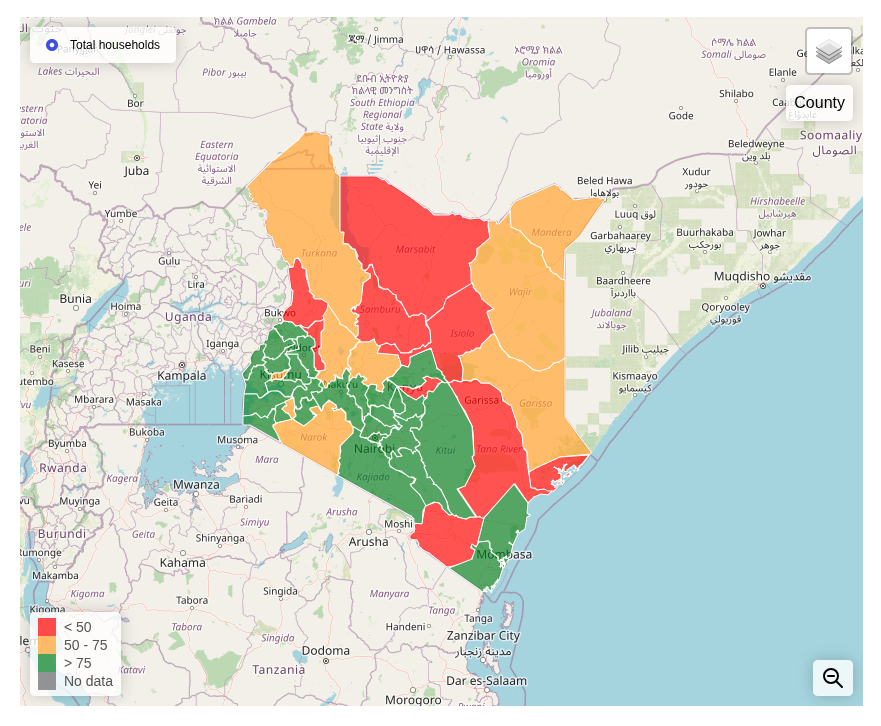
Map indicators are organized into pages. When clicking on the "Map" menu item from the top nav bar, we are presented with a menu of all the map indicator pages. Once we select one, we are taken to the map interface where we have all the indicators represented on the top left side of the screen. We can switch between the indicators by selecting them one at a time.
Using the Map
On the top left, we have the Indicator selector
- On the top right first we have the basemap selector and below it we have the Current geographic level display
- On the bottom right we have the Zoom out, step back a level tool
- On the bottom left, we have the Map legend
- Moving your mouse over a specific area on the map displays its precise value and other relevant information.
- Clicking a region may drill down into that region and will display the next set of geographic areas/subdivisions for that area. This is the drilldown mode.